
Whenever I run a long campaign or one with in-depth information, I like to create a lore archive or wiki for all the campaign information — Rules, custom items, NPCs, locations, etc. — all the things that it is easy to forget from one bi-weekly or monthly game to the next. These aren’t the in-depth notes you might write to yourself or the hardcore, deep-dive into the background information that is often more interesting to the Game Master than the players. Instead, these are the condensed, easy to parse overviews of things the players may want to reference later but wouldn’t remember the details of at the time. Who were the people in that Shadow Giants’ mercenary guild we met? What was the name of that seller at that one town where we got a good deal on magic potions? While being a good reminder, these kinds of campaign wikis also serve as an artifact of the game, a way to go back and look at your journals and remember what happened.
I’ve looked at many ways to build these – Trello [1], paid online services like Kanka [2] and World Anvil [3], building my own websites (because that is within my skill), a Foundry [4] instance hosted online, etc. Each of those was good in their own way, but often fairly complex or harder to get a simple and easy to parse setup out of. Recently I came back to one I had used far in the past and realized the new version is even better and more accessible for campaign wikis – Google Sites. [5] I’d built with this quite some time ago, but they have recently revamped their service and I find it even easier to use.
Google Sites As A Campaign Wiki
 What does the current iteration of Google Sites do so well that I’d recommend it? First, it’s easy to build something that looks good without major tech skills. Working like most online website builders, you will probably find it easy to work with but somewhat limited. That’s actually a nice mix as it keeps you from going too far afield of a clean experience with lots of tables and complex layouts. If you keep things condensed, you can really get a lot out of the site. It’s also fairly easy to organize information. I played around with a few of their built-in layouts and found good ways to organize information like lists of NPCs, complex dumps of custom rules, etc. There were some easy to use modules that made things fit a good user flow.
Organization of information was actually pretty easy. Everything in Google Sites is laid out with boxes in columns and rows. Drag a text box over and you can resize it in the grid structure. Drag an image over and do the same. Create a new row and you can drag into that with everything maintaining the same height. A lot of the architecture I use to build websites is integrated in such a way that it is almost hard to ignore. Useful elements like collapsible rows and the ability to link up text and image boxes make creating some well laid out sections easy. Google Sites is also useful in deciding who gets to see what. You can share certain pages or the entire site with only a select audience or make it public. That lets you create GM / Co-GM sections or keep some elements private to everyone while letting some information become public.
Some Tips For Building In Google Sites
I’m not going to give a full tutorial on building with Google Sites – others already have so I’m just going to link their work – but I will give a brief overview and then show how I lay out a decent and compressed campaign wiki. Here are some quick tips:
- Building in Google Sites is as easy as dragging a module from the right hand side of modules and resizing it.
- There are custom layouts, but the drag and resize is the core way you will make anything.
- Every element will live in rows and each row will be as large as the biggest element in it.
- Collapsible rows are good for large text dumps, but it is often good to let a collapsible row be full width rather than stack them next to each other.
- Collapsible rows cannot (unfortunately) hold other text boxes or images. That would be wonderful and let you gather things together in a much better way.
- You can use images and text and can resize so your text is to the right with your image to the left, but you cannot put images inside of text boxes.
- You can drag a text box to the bottom of an image to link it up and make it so that clicking the image reveals the text.
- You can do more complex things like tables and videos with the “embed” module, but that will require some coding knowledge.
- Tables cannot be created in text boxes, but you can make mock tables with tabs that are decent enough.
- The navigation module will include every header you have in your page, but you can also hide ones from it to just create a table of contents to important sections.
- If you want more spacing between rows, drop a spacer module or an empty text box.
Here are some tutorials that go more in-depth on how to build sites:
- https://edu.google.com/intl/ALL_us/for-educators/product-guides/sites/?modal_active=none [6]
- https://zapier.com/blog/google-sites-tutorial/ [7]
- https://www.youtube.com/watch?v=0woNTtlcxgM [8]
Tips for Building a Campaign Wiki
Building a wiki useful to your campaign requires a little content specific layout and thinking. Depending on what you want to convey, it will be different for your game but here is how I lay mine out.
- Navigation – Google Sites offers two types of navigation – side “hamburger / 3 line” menu or top. I like to keep to the top because it keeps all the pages visible, but long page titles or many pages may necessitate the side navigation.
- 3 Column Layout – When I build pages that are meant to give quick recaps on info for things like people or locations, I like to focus on columns that start with an image and then put the data below. I played with many different options, but I liked this from a user interface perspective if I’m going to have a lot of similar elements. It allows a quick scan to the person, item, or location you may be looking for info on and then a visual scroll down to get the relevant details. I can also do a basic description and then bullet points of events or new information like “betrayed group at Tarin’s Pass” etc.

- Link Out – Things that don’t work well in the Google site can easily be linked out to and stored as Google files. I have a whole “handouts” section to keep the detailed pdfs and other materials I make. With this setup, storing those online and making them easily accessible is as easy as dragging in the Google Drive widget. I describe this in the Handouts page description, but if something doesn’t work well on the Google site, it’s often better to move it to where it does and link to it. The Google site can act as a landing area that gets you where you need to go.
- Page Organization – When I begin laying out a campaign wiki (or any website), I determine the pages I’ll need that will be the biggest buckets of information. Here’s a link to a generic campaign filled with placeholders that you can look at live. [9] I like to keep fewer pages with longer scrolls since that mirrors modern usage patterns for websites and makes it easier to get in the general area without a lot of searching. These are the biggest pages I usually use.
- Homepage – On my homepages I like to do a recap and then create a box navigation structure – 6 or 7 boxes that have images and links to the sections. The navigation menu is easy.
- People and Organizations – This is all of the groups and NPCs that the party meets along the way. I like to keep rows for Allies, General, Antagonists, and Minor, but that all depends on the type of campaign.
- I usually build this with 3 columns of Image – Text / Image – Text / Image – Text. This makes it easy for players to glance over and see the people they were expecting rather than the name they weren’t remembering. That big Orc they met with the metal jaw is going to be much easier to recognize visibly, especially if I found or created some kind of image for them.
- I like to include bullet points for recent interactions as well. That is a good way to quickly remind players “Allea is pissed you shortchanged her on the last interaction,” and guide their play decisions.
- Locations – The Image / Text option is useful here as well. You can also use collapsible rows with a header of “Read More” if you have a lot of info to convey. Image, then brief description, then read more with details is a good way, but I follow the similar layout for people and organizations.
- If I include big world maps, I like to link out to them rather than keep them in the page. Often times you can’t zoom in enough. If I’m lucky enough to have an interactive map or something at high enough resolution, I just include the link at the top.
- I then segment locations into big areas – continents or regions, even planets if I’m running a space game. If it’s more local, just a list or organization by purpose is good.

-
- Items – For my items and goods sections, I often include my general price ranges so players can quickly assess what a thing may cost. If I’m using detailed prices, I often link out to a PDF or Hombrewery pamphlet with all the details. I could also write up a whole separate page with the details or include a collapsible row if I needed.
- Most often what I do with Items pages is write up the detailed descriptions of magic items so they are easy to reference later or create item lists for stores. I can use things like 5E Magic Shop [10] or other generators to create the list of available goods and just put it in the items page so players can browse as they want.
- I don’t tend to hold to a perfect layout of 3 or 4 columns of equal width, instead I base the layout on the amount of description I need. If I have 5 different potions that have just a bit of info, I might put them in two rows. If I have a custom potions writeup that has 5 bullet points, I create one big box. It all comes down to how much content people will have to parse and how much space that requires.

- Custom Rules – Often times I’m using a lot of custom rules for my games. I’ve dropped a series of articles detailing them in case they are helpful to others running high action, high fantasy, jrpg themed games. If I have specific rules that I know people will need to reference quickly, I drop them on a separate page and use collapsible sections. The biggest thing people need to remember is how they can use their inspiration or what that rule about drinking potions per session was – 2 per con bonus? More in-depth rules pamphlets I save for a handouts page.
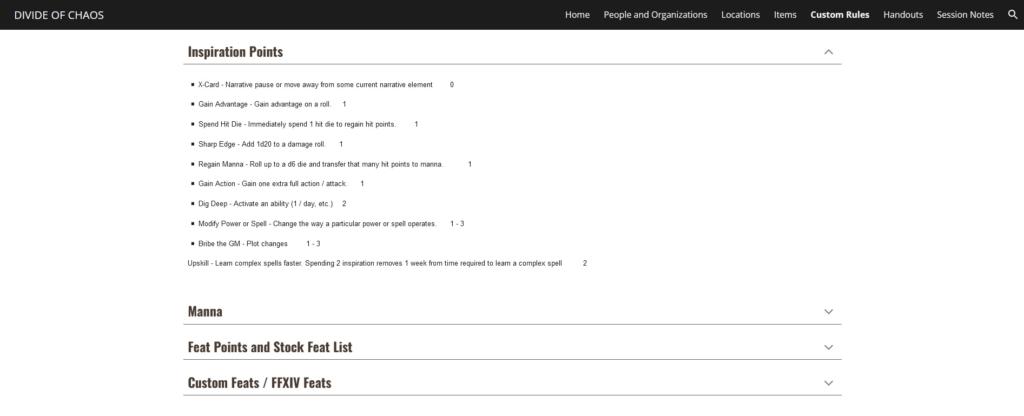
- Handouts – I like to make handouts and other elements for games – things to increase immersion and give people something to consume to build up the world’s concepts. For me those are often videos, interactive dialogues, and small animations – but they could as easily be PDFs, Word docs, or images. The handouts section is actually really useful when combined with Google Drive. I can create a folder, set the permissions to be the players, and just drop the Google Docs widget with the folder in. Now people can open everything there. That handles almost anything I might make for a game. If something lives on YouTube or someplace else, I can link to it from that page.
- Session Notes – I keep bullet point session notes for pretty much every game. Future John is going to forget the details just as much as my players are, but that quick reminder is all I need to reconnect the memory pathways. Collapsible rows are great here as well. You can scroll down to the session, open it, and quickly breeze through the notes you kept. You could also link out to a Google Doc or other journal if you have more in-depth setups.

- Lore and Info – Often times in my games much of the “lore” that doesn’t fit other categories moves to handouts, but I can also just put it in it’s own section arranged with the 3 columns setup or collapsible rows. Things that might go here are thematic setting specific information, like how air bubbles in spelljammer work or what the general populace of the world knows about magic. This one is very much dependent on the info you need to present and how in-depth you want to go with it.
- Items – For my items and goods sections, I often include my general price ranges so players can quickly assess what a thing may cost. If I’m using detailed prices, I often link out to a PDF or Hombrewery pamphlet with all the details. I could also write up a whole separate page with the details or include a collapsible row if I needed.
Conclusions
Google Sites [5] isn’t going to be a perfect solution for everything you might want out of a detailed campaign wiki that mirrors the complexity of Game of Thrones, but it works really well for the quick blurbs and info that is useful in most campaigns. It’s pretty easy to use for a non-technical audience, but a few improvements would make it a bit more flexible. For a quick and easy to build campaign wiki, it’s the easiest and most accessible option I’ve found so far. There are more complex and detailed gaming ones that I’ve tried, but they often had similar limitations or required a bit more technical knowledge. For the limitations of Google Sites, it had a lot of good enough options. If you’re looking for a place to do a quick and free wiki for info, look into it.
- Generic Campaign Wiki Example [9]
- Make a copy of the campaign template
- Open this Google Docs folder [11] while logged into a Google account.
- Right click on the Genereic RPG Google Sites Campaign Wiki Template.
- Choose Make a Copy.
- The Google site template will be copied to your Google Drive and you can edit the copy from there.
10 Comments To "Why Google Sites Should Be Your Next Campaign Wiki / Lore Management System"
#1 Comment By Rob Abrazado On January 4, 2023 @ 10:19 am
How is it for managing a collaborative site with multiple contributors? To me, that’s the hallmark of a wiki.
#2 Comment By John Arcadian On January 4, 2023 @ 11:05 am
Very good. Just like collaborating in Google Drive or Docs, you can give different people different permissions per page or for the site in total. I try to keep the number of pages lower with more navigation elements to go to sections on the page, but you could easily have more pages and general permissions for everyone in the game. So, if you were okay with it you could make most pages editable / allow editors to make new pages and then restrict certain pages to only yourself or another person OR you could go more detailed and change permissions per page.
It’s pretty flexible, which is nice. The google docs integration is also nice. I have a handouts section that people can drop things into or find the videos I make and those are all base Google permissions.
#3 Comment By Rob Abrazado On January 4, 2023 @ 10:30 pm
Very cool!
#4 Comment By griffon8 On January 4, 2023 @ 7:56 pm
Have you looked at Obsidian Portal? I have found that website very useful for campaign tracking.
https://www.obsidianportal.com/ [12]
#5 Comment By John Arcadian On January 4, 2023 @ 9:44 pm
I used obsidian portal a long time ago, and it was okay but not my favorite. While there are a few specific things it can do with rolls and other specific things, most of those are in the paid plan. Many of the other benefits of the paid plan are baseline features in the Google Sites setup.
It’s going to be different tools for different needs, but right now I’d suggest google sites before I’d suggest Obsidian Portal unless someone wants some of the more in-depth stuff and is willing to pay for the plan. Plus, they list the upload limit on the free version as 2MB.
#6 Comment By Fridaynightsushi On January 8, 2023 @ 5:37 pm
do I have to buy a domain to share my site with my players?
#7 Comment By John Arcadian On January 8, 2023 @ 7:56 pm
Nope, no need to buy a url or domain.It should all be totally free to use. You would just have a url like sites.google.com/view/###campaignname#####.
The generic site you can copy is at https://sites.google.com/view/genericrpgcampaigntemplate/ [9]
You can make the site public or private and only share it with the players once they sign in or you can set it to be visible to anyone who has the link.
#8 Comment By GOAL wORLDS On January 31, 2023 @ 5:18 am
Is there a way to set it up so that different pages (or even different parts of the same page) have different visibilities? This way the GM could keep secrets and/or their own notes in the same place without players seeing them.
#9 Comment By John Arcadian On January 31, 2023 @ 10:46 am
Hiding different pages is easy, you get to decide who each page is shared with. So, you could do just one player, all players, no players, etc. just by assigning different sharing options to a particular page. Different parts of the same page – I don’t believe so. There could be some setting I don’t know about, but it doesn’t seem like an option that would be built in by default.
#10 Comment By OvertheHillGame On February 1, 2023 @ 1:10 am
I, too, have been down this bitter road. Obsidian Portal, World Anvil, Inkarnate, etc, etc. Each was a eureka moment. I am sure Google Sites is excellent, too. All of them were wonderful and horrible, too. The hope: to start off fresh, get organized, and finally make my campaign spin like a top with everything at my fingertips. Kinda like the beginning of a college semester. So much promise. The reality was I’d spend most of my time fiddling with technology, inputting stuff into little text blocks, loading images, resizing, etc. Hours upon hours of mostly mindless work. Why? Because that’s what the app said. It was taking over my GMing life.
So I dumped all of it — wikis, websites, cartography software, battle maps, etc. Did it impact the quality of my campaign? Yes, it made it better because players became focused on the plot, the characters, and the world around them and not technology. Don’t get me wrong, some technology is critical, I couldn’t play with my friends in Wisconsin or Arizona otherwise. But a lot of it can be ditched and you’ll find it will improve your campaign and your life.